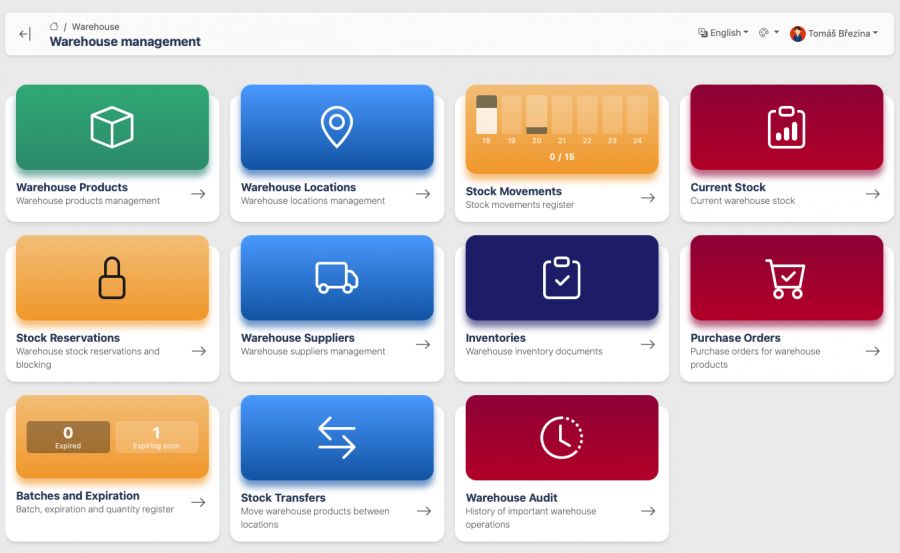
The warehouse system built on iWeb helps companies manage products, locations, reservations, purchase orders, inventory checks and stock movements in one place. It is designed for small and mid-sized operations that need a practical custom application without the weight of a large enterprise platform.
What it solves
In many companies, the problem is not that warehouse data does not exist. The problem is that it lives in spreadsheets, notes, emails or individual people’s heads. The system brings important warehouse information into one administration interface and shows what is in stock, what is reserved, what needs attention and where differences appear.
The application is modular. Standard parts use reusable iWeb administration modules, so fields, settings and workflows can be adjusted quickly. Specific workflows such as mobile inventory counting, dashboards and printable documents are handled by focused frontend components and custom API endpoints.
Key features
- warehouse items, codes, EAN, minimum stock levels and units
- warehouse locations and current stock by item and location
- reservations for jobs, projects, service work or manual reasons
- suppliers and multiple suppliers per warehouse item
- purchase orders with items, prices, statuses and printable documents
- receipts, issues, transfers between locations and stock movement history
- inventory checks with expected, counted and difference quantities
- mobile stock counting by product code or EAN
- batches, expiration dates and expiration dashboard
- audit history for important warehouse operations
Mobile inventory counting
Inventory counting is prepared for mobile use. A user opens an inventory document on a phone, scans an EAN or enters a product code, checks the location and saves the counted quantity. The system stores who counted the item and when, so the values remain traceable.
This workflow is useful for companies that do not want to write stock levels on paper and then enter them again at a desk. Counting can happen directly in the warehouse, near a shelf or at a branch location.
Dashboards and printable documents
The warehouse dashboard provides quick access to modules and important overview widgets, such as stock movements or upcoming expirations. Purchase orders have a dedicated printable page designed in the style of business documents, so they can be used outside the administration interface.
Who it is for
The system can fit service companies, small e-commerce teams, technical operations, rental businesses, light manufacturing, internal material records or any company that has outgrown spreadsheet-based stock management. It is strongest where a usable application needs to be delivered quickly and then adapted to real workflows over time.
Why iWeb
iWeb makes applications like this faster to build than a traditional from-scratch project. Most administration screens are driven by module, field, translation and permission configuration. Custom development is added where it creates real value: specific endpoints, custom views, dashboards, printable documents or integrations.
The result is an application that is reusable enough to deploy quickly and flexible enough to fit a specific business.
Need a custom warehouse system or want to replace spreadsheet-based stock management? Get in touch and we can design a workflow around your real operation.